Why MCP, when we already have APIs?
Every system already has an API, so why does an assistant need another protocol on top? Because an API is written for a developer who reads the docs once, and MCP is written for a model that reads them on every call.
Whenever MCP comes up in a design review, someone asks the same fair question: our systems already have APIs, the model can already call functions, so why add a protocol in between? Isn't this just another wrapper?
It is a wrapper. That's the point. MCP doesn't replace your API. It sits in front of it and describes it for a different kind of caller. Once you see who that caller is, most of the design makes sense.
An API is written for a developer. MCP is written for a model.
A normal API assumes a developer on the other end. They read the docs once, write code against a handful of endpoints, test it, and ship. The decisions about which endpoint to call, in what order and with which fields are made once, by a person, and frozen into code.
A model works the other way round. It has never seen your docs. It decides at runtime, on every request, which of the tools in front of it to use and what to pass. All it has to go on is what it's shown at that moment.
| A developer calling an API | A model calling a tool | |
|---|---|---|
| Learns the interface | Once, from docs | Every call, from the description |
| Chooses what to call | At build time, in code | At runtime, per request |
| Gets it wrong | A failing test | A confident wrong action |
| Handles a big surface | Fine, uses what it needs | Badly: 300 endpoints fill the context |
| Auth | Configured once by the team | Per user, often in someone else's app |
That last column is the whole reason for MCP. Everything in the protocol is there to make life easier for a caller who reads the interface fresh each time and acts on it immediately.
The real problem is N × M
Say you have four places where people use an assistant: a chat app, an IDE, a support console and your own agent. And four systems they need: documents, tickets, orders and the calendar.
Without a shared protocol, every assistant needs its own integration with every system. That's sixteen pieces of glue code, each with its own idea of how to describe a tool, handle auth, and format results. Add a fifth system and you write four more.
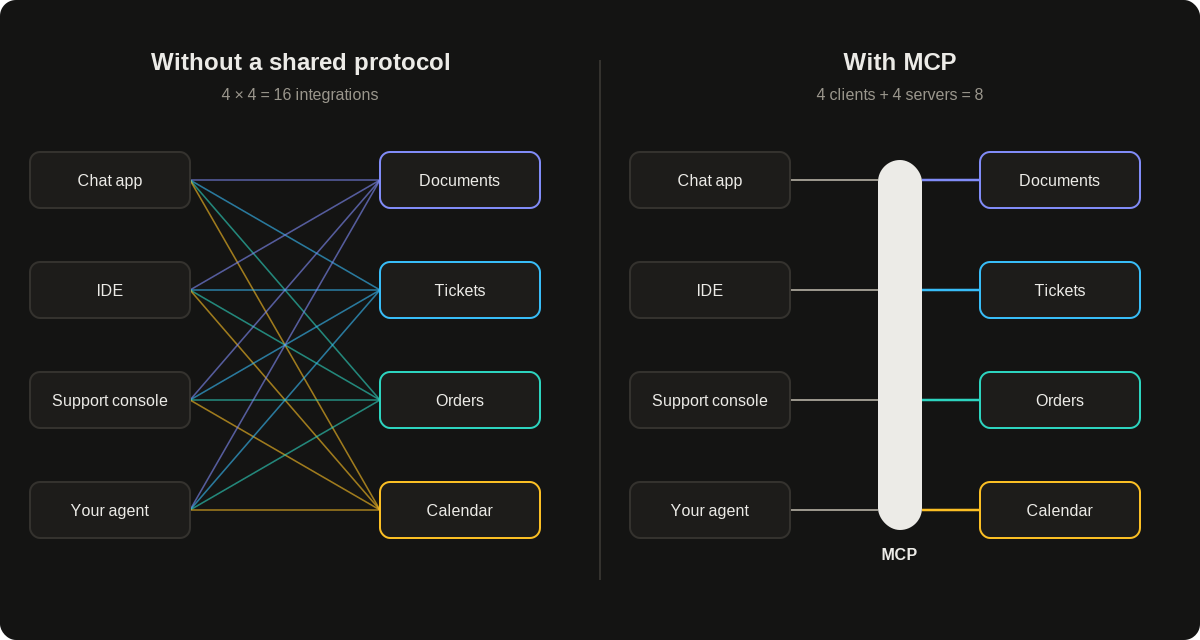 Sixteen integrations become eight. Every new system costs one server, not one per assistant.
With MCP, each system gets one server, and each assistant learns to be one client. Sixteen becomes eight, and a new system costs one server that works everywhere.
If that sounds familiar, it's the same move the Language Server Protocol made for code editors. Before LSP, every editor needed its own plugin for every language. After it, a language wrote one server and every editor could use it. MCP borrows that idea directly, and it works for the same reason: the people who build the tools and the people who build the clients are different people, in different companies, shipping on different schedules.
What MCP actually adds on top of your API
"Just a wrapper" undersells it a little. Here's what a client gets from an MCP server that it wouldn't get from a plain REST API.
Discovery at runtime
A client connects and asks the server what it can do. The server answers with its tools, each with a name, a description and a JSON Schema for its arguments. Nothing is hard-coded on the client side. Add a tool on the server, and every client sees it on the next connection, or straight away if the server sends a "tools changed" notification.
{
  "tools": [
    {
      "name": "get_order",
      "description": "Look up one order by its number. Returns status, items and delivery date. Only orders the current user can see.",
      "inputSchema": {
        "type": "object",
        "properties": { "order_id": { "type": "string", "pattern": "^\\d{5,}$" } },
        "required": ["order_id"]
      }
    }
  ]
}
One shape for every call and every result
Every call looks the same, whichever system is behind it. It's JSON-RPC: a method, a tool name and arguments. Every result comes back as content blocks (text, images, links to resources) with a flag for errors. The client writes one piece of code to call any tool and read any result.
→ { "jsonrpc": "2.0", "id": 7, "method": "tools/call",
    "params": { "name": "get_order", "arguments": { "order_id": "48213" } } }

← { "jsonrpc": "2.0", "id": 7,
    "result": {
      "content": [{ "type": "text", "text": "Order 48213: out for delivery, arrives today." }],
      "isError": false } }
Compare that with what sits behind it: a REST endpoint with its own URL scheme, pagination, error codes, field names and date formats. The MCP server absorbs all of that once, so neither the model nor the client has to.
A session, not just requests
An MCP connection is a conversation between client and server. They agree on what each side supports when they connect. The server can report progress on a slow call, the client can cancel one, and either side can send notifications. A plain request-response API has no standard way to do any of that.
It runs locally as well as remotely
Plenty of useful tools don't have a server at all: your file system, a local git repo, a database on your laptop. MCP can run a server as a local process and talk to it over standard input and output, or over HTTP when the server is remote. The same client handles both. A REST API assumes there's something listening on a port.
More than tools
Tools are the part everyone talks about, but a server can also offer:
- Resources: things to read rather than actions to take, like a file, a schema or a record. The client or the user can attach them as context.
- Prompts: reusable templates the server author has tuned, like "summarise this ticket".
- Requests back to the client: a server can ask the client's model to generate text (sampling), or ask the user a question mid-task (elicitation). The server doesn't need its own model or its own UI.
Sign-in that any client can do
MCP standardises how a remote server asks for authorisation, using OAuth. The client knows how to run that flow, so the user signs in to the document system as themselves and the server acts with their permissions. Without that, every client invents its own way to collect and store credentials for every system, and most of them end up using a shared service account.
What it looks like to build one
The surprise for most teams is how small a server is. Here's a complete one in Python that puts an existing orders API in front of any MCP client.
from mcp.server.fastmcp import FastMCP
import orders_api  # your existing client for the REST API

mcp = FastMCP("orders")


@mcp.tool()
def get_order(order_id: str) -> str:
    """Look up one order by its number. Returns status, items and delivery date."""
    o = orders_api.get(order_id)
    return f"Order {o.id}: {o.status}, {len(o.items)} items, arrives {o.eta:%d %b}."


if __name__ == "__main__":
    mcp.run()
The function name becomes the tool name, the type hints become the schema, and the docstring becomes the description the model reads. Notice what the tool returns: one readable line, not the forty fields the API sends back. That's deliberate. The API is designed to give a program everything; the tool is designed to give a model what the next decision needs.
"Can't the model just read our OpenAPI spec?"
It can, and for one app talking to one API this sometimes works. It falls down in a few predictable ways:
- It's too big. A real spec has hundreds of endpoints. Load all of them as tools and you've spent a large part of the context window before the user has said anything, and given the model hundreds of near-identical options to choose between.
- It's shaped around resources, not tasks. "Refund a damaged order" might be three calls in the API: look up the order, check the policy, create the refund. A tool can be one call that does it safely.
- The descriptions are for people. "Returns the order object" is fine for a developer who can click through to the schema. A model needs to know when to use it and when not to.
- Everything else is still missing. Discovery, auth, sessions and a shared result format still have to be solved by every client, separately.
"We already have function calling"
This is the other common confusion. Function calling and MCP solve different halves of the problem.
- Function calling is how a model asks for a tool: the format your code and the model's API agree on.
- MCP is how tools reach your code in the first place, from servers that someone else may have written.
A typical client uses both: it collects tools from its MCP servers, hands them to the model with function calling, and when the model asks for one, routes the call back to the right server. If all your tools are functions in your own code base, you don't need MCP. Function calling is enough.
When you don't need MCP
It's a good protocol, not a requirement. Skip it when:
- There's no model in the loop. A service talking to another service should use the API directly. Adding MCP buys nothing and costs a hop.
- One app, one model, your own tools. Plain function calling is simpler. You can add an MCP server later if other clients need the same tools.
- It's a high-volume, fixed pipeline. If the steps never change, write them as code. Letting a model choose them each time adds cost and risk.
MCP earns its keep when the caller is a model, and when the people writing the tools are not the people writing the assistant.
What MCP doesn't fix
The protocol is a thin layer, and it inherits whatever's underneath.
- A badly designed API makes badly designed tools. Wrapping every endpoint one-to-one is the most common mistake I see. Design tools around the tasks people ask for, not the endpoints you happen to have.
- Permissions are still your job. MCP gives you a standard way to sign in. It doesn't decide what each user should be allowed to do, or check it.
- Tool output is untrusted text. Whatever a tool returns goes straight into the model's context, including any instructions someone has hidden in a document or an email.
I've written about that second half separately, in MCP in the enterprise: gateways, per-user auth, versioning and prompt injection.
The short answer
When someone asks "why MCP when we have APIs?", this is what I tell them:
The API is how programs talk to your system. MCP is how agents do.
Keep the API. It's the real interface, and everything else depends on it. Put a small MCP server in front of it, designed around the jobs people actually ask an assistant to do. Then every assistant your organisation uses, including the ones you didn't build, can do those jobs properly.